동생이 과제로 파이썬을 한다고 하길래 뭔가 하고 봤더니 그래프를 그리는 과제였다.

파이썬으로 그래프 그리는 건 개발 맨~~ 처음에 배울 때 잠깐 발에 물 닿을 정도로만 해 본 적이 있어서 내가 도움을 줄 수 있을 것 같았다.


Matplot은 txt 파일의 데이터를 간단하게 그래프로 나타낼 수 있다.

엄청 짧게 코드를 짤 것 같아서 colab을 사용했다.


from google.colab import drive
drive.mount('/content/drive')

txt 파일을 굳이 로컬에 저장 안해도 구글드라이브에 마운트 하면 다 갖다 쓸 수 있음 ㅋ


import matplotlib.pyplot as plt
import numpy as np

ecg = np.loadtxt("/content/drive/MyDrive/ecg.txt",delimiter=" ",unpack = False)
print(ecg.shape)

# x축
time = ecg[:, 0]
# y축
amplitude = ecg[:, 1]

# plot 세팅
plt.figure(num=1, dpi=100, facecolor='white')
plt.plot(time, amplitude, color="blue", linewidth=0.5)

plt.title('ecg')
plt.xlabel('time(sec)')
plt.ylabel('amplitude')
plt.xlim( 0, 3)
plt.ylim(-1, 1)

plt.show()

numpy로 txt파일을 가져오고, 구분자는 띄어쓰기로 해서 데이터를 구분했다.
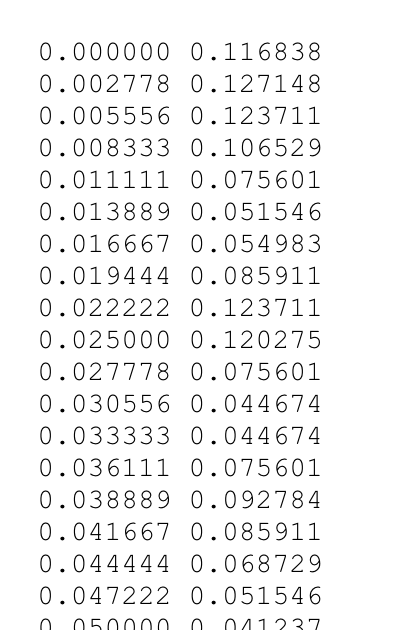
데이터들이 이런 식으로 정렬이 되어 있었기 때무네 ㅋ

첫째 행이 x축(time)에 와야 할 값, 둘째 행이 y축(amplitude)에 와야 할 값이므로 0부터 시작해서 끊어주었다.


그 다음 나타낼 그래프를 Matplot으로 세팅하는데 사실 대충 구글링 해서 색 같은거 붙여 넣음.

x축, y축 최소값, 최대값 정도만 설정해 주었고

코드를 실행하면 다음과 같다.
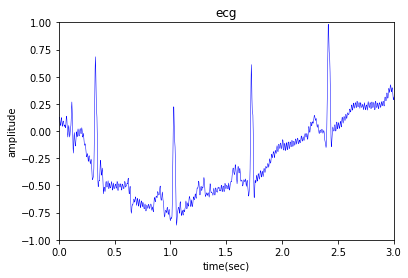
이게 바로 심전도 그래프라고 한다 ㅋ

아주아주 간단하게 그래프가 만들어졌다.


wikidocs.net/92071


위키독스

온라인 책을 제작 공유하는 플랫폼 서비스

wikidocs.net

위 링크를 참조하면 Matplot에 대한 자세한 설명을 볼 수 있다.


과제 끝.
https://docs.djangoproject.com/en/3.1/howto/custom-management-commands/


Writing custom django-admin commands | Django documentation | Django

Django The web framework for perfectionists with deadlines. Overview Download Documentation News Community Code Issues About ♥ Donate

docs.djangoproject.com

python에서 manage.py 뒤에 입력할 명령어를 직접 만들 있다.

cumstom command 만들면

python manage.py 명령어

이렇게 터미널에 입력하면 촤촤촤 동작하는 거임.


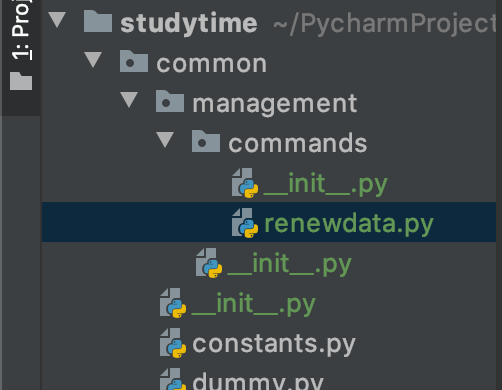
문서에 나와 있듯이 명령어를 만들고자 하는 경로의 순서와 이름을 위와 같이 해야 한다.

문서에서는 장고 내의 경로에 만들라고 했는데, 나는 특정 내에서 만들려고 했던 아니라서 공통 파일들을 담고 있는 common 생성하였다.

__init__.py 파일은 그냥 최하단에 하나 만들어 줬더니 상위 경로에도 갑자기 생겼다. ㅎㅎ... 모듈화 그런건가?

명령어의 네이밍은 문서에서도 딱히 어떤 명명규칙을 따른 같지 않아서 나도 그냥 .


여튼 이렇게만 하면 작동을 하지 않아서 common settings.py 내의 INSTALLED_APPS 추가해 주었다.

INSTALLED_APPS = [
    'django.contrib.admin',
    'django.contrib.auth',
    'django.contrib.contenttypes',
    'django.contrib.sessions',
    'django.contrib.messages',
    'django.contrib.staticfiles',
    ...
    'common'
]

이제 renewdata.py 다음과 같이 작성한다.

from django.core.management.base import BaseCommand, CommandError
from studydata.models import Flower, FlowerGarden, Leaf
from user.models import User

import datetime

class Command(BaseCommand):
    help = 'Renew data at midnight everyday'

    def handle(self, *args, **options):
        # User 조희
        users = User.objects.filter(nickname='박범희')

        for user in users:
            # 해당 user에 대한 Flower 조회
            flowers = Flower.objects.filter(st_id=user.st_id)
            # user의 flower가 없는 경우 에러 메시지
            if flowers.count() == 0:
                self.stdout.write(self.style.ERROR('No flower of the user: ' + user.st_id))
            else:
                # 정상
                for flower in flowers:
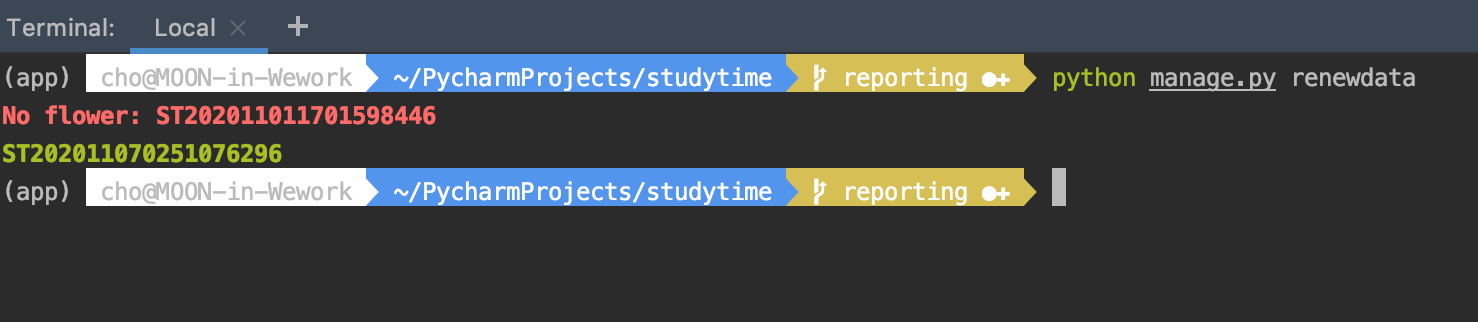
                    self.stdout.write(self.style.SUCCESS(flower.st_id))

문서를 읽어보고 따라해야 .

클래스 이름은 대문자 C 시작하는 Command여야 하고, django의 BaseCommand를 상속해야 한다. handle 함수도 작성해야 한다.

다른 사람은 input 대한 함수도 작성했는데 나는 딱히 필요 없었음.


간단하게 출력 메시지를 확인하기 위해서 대충 저렇게 데이터 조회를 했다.

잘됨!!

별로 중요하진 않은데 출력 메시지에 관한 내용은 다음에 있음.

https://docs.djangoproject.com/en/3.1/ref/django-admin/#syntax-coloring


django-admin and manage.py | Django documentation | Django

Django The web framework for perfectionists with deadlines. Overview Download Documentation News Community Code Issues About ♥ Donate

docs.djangoproject.com


+ Recent posts